Nintex Community Menu Bar
Question

Boxes or shading on tables/sections

  • Jun 27, 2024 8:52 PM UTC
  • 5 replies
  • 20 views
  • Translate All

Forum|alt.badge.img+1

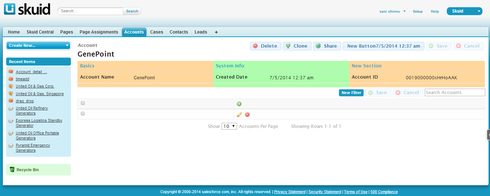
Is there a way to put boxes around each table/section or maybe shade the backgrounds so the zones are clearly differentiated? I have two columns that each have several tables/sections and things run together visually. I suspect it could be handled with the proper CSS, but I’m not a developer. 😦 Thanks!

This topic has been closed for replies.

5 replies

Forum|alt.badge.img+1
  • Inspiring
  • Jun 27, 2024 10:21 PM UTC

You don’t need to be a developer to use CSS!  Don’t be afraid!  John did a developer talk this morning on the basics of using CSS to style skuid pages.  We’ll get it up on the skuid Youtube page in the next day or two.  You should check it out. 

Translate

Forum|alt.badge.img+1
  • Author
  • New Participant
  • Jun 27, 2024 10:21 PM UTC

I’ll keep an eye out for it. This stuff is really important to some folks. Thanks.

Translate

Forum|alt.badge.img+1
  • Inspiring
  • Jun 27, 2024 10:21 PM UTC

Here is the video.


Hope it helps you out… 

Translate

Forum|alt.badge.img+1
  • Author
  • New Participant
  • Jun 27, 2024 10:21 PM UTC

Yes, that was greatly helpful! I have TWO followups related to syntax on the css. I used the following to set colors in the field editor column - worked great: .nx-basicfieldeditor-column .nx-basicfieldeditor-section-wrapper .nx-basicfieldeditor-section-header { color: black; } .nx-basicfieldeditor-column .nx-basicfieldeditor-section-wrapper .nx-basicfieldeditor-section {background-color: #F0E68C; } .nx-basicfieldeditor-column .nx-basicfieldeditor-section-wrapper .nx-basicfieldeditor-item {background-color: #FFFFE0; } Question #1) When I want to specify a colorset for the first section, I follow “nx-basicfieldeditor-column”, etc by the suffix “:first-child”. What suffix do I use for sections 2 or 3? I tried :not(:first-child) and also :second-child. Question #2) I’ve been trying to do something similar for my column of TABLE components (related lists). I want to set font & background color for the column header row and for the detail rows. I’ve tried several combinations of field names/formats on this, but can’t get it right. .nx-pagebuilder-table .nx-pagebuilder-wrapper .nx-pagebuilder-table-header: { color: black; } .nx-pagebuilder-table .nx-pagebuilder-wrapper .nx-pagebuilder-table {background-color: #F0E68C; } .nx-pagebuilder-table .nx-pagebuilder-wrapper .nx-pagebuilder-item {background-color: #FFFFE0; } Any insight would be very much appreciated. Thanks bunches!

Translate

Forum|alt.badge.img

may be this will useful i am not sure…

 .nx-basicfieldeditor-section{background:none;}
 .nx-basicfieldeditor-item{background:none;}
 .nx-basicfieldeditor-column:nth-child(odd){background:#FFD79C;}
 .nx-basicfieldeditor-column:nth-child(even){background:#ADFDAC;}
987edcd667e06f9fe438e15dc06936a98c3190fa.png

Translate