

Company Annual Virtual Conference
Archive
Recently active
Les Robots: Une IntroductionLes Robots: Une IntroductionLes robots jouent un rôle de plus en plus important dans notre vie quotidienne. Mais qu'est-ce qu'un robot exactement ? Ce terme recouvre une grande variété de machines qui peuvent réaliser des tâches de manière autonome ou semi-autonome.Définition d'un RobotUn robot est un dispositif mécanique capable d'effectuer des tâches programmées ou d'interagir avec son environnement de manière intelligente. Les robots peuvent être équipés de capteurs, de circuits électriques, et même de capacités d'intelligence artificielle qui leur permettent d'apprendre et de s'adapter.Différents Types de RobotsIl existe plusieurs catégories de robots, chacune ayant ses propres applications et caractéristiques :Robots industriels : Utilisés principalement dans les lignes de production pour des tâches répétitives comme l'assemblage, le soudage, et la peinture. Robots de service : Conçus pour assister les humains dans différentes tâches comme le nettoyage,
Become a Nintex Partner
TopicWhen Microsoft Defender for Cloud Apps (MCAS) is setup in an Office 365 environment, users are unable to open both Workflows and Forms due to MCAS adding mcas.ms to the URL. Instructions Nintex currently does not provide any accreditation or official support for Microsoft Cloud App Security (MCAS).If MCAS is enabled then kindly disable MCAS as Nintex is not compatible with MCAS.Additional Information If you would like to see this feature in Nintex please vote on the following feature request: https://ideas.nintex.com/ideas/IDEA-I-1381
Look, obviously we would like you to use the community as the first point of contact when encountering questions or problems, as chances are your peers have dealt with them before! But, if you’re encountering a problem the community really can’t fix, we’re also not going to make it difficult for you to find us—We’re here to help! What to check before reaching out to support:Looking for best practices Luckily we have so many clients that have used our software in ways we could have never imagined. We’d suggest posting your question here (link). Issues with 3rd party scripts and implementations Don’t get us wrong, we love 3rd party scripts just as much as any other person. However, given their nature (3rd party) we also can’t take responsibility for their inner workings. Please consult the 3rd party in question, or the developer that helped you set them up. Contact details Email: support@company.com (We will get back to you within 24 hours) Status updates: www.company.com/sta
Have you or your users come across these error messages? validation.user_register.ratelimit or validation.user_login.ratelimit. This is due to our rate limiting feature being applied when specific users or actions exceed a defined limit. We've developed the following rate limits: Limit on failed registration: visitors from one IP cannot attempt more than 5 tries per hour when registering a user Limit on failed login: visitors from one IP cannot attempt more than 5 tries per hour when trying to login as a user You don't want this limit in your instance? No problem, just drop us a line at support@company.com and we can disable it for you. The phrase is not shown correctly? If the errors are shown as validation.user_register.ratelimit or validation.user_login.ratelimit, it can be confusing for users to figure our what is going on. You can easily change them by adding the following phrases in the control environment of your community: Module: Common, Key: validation.user_login.ratelimit
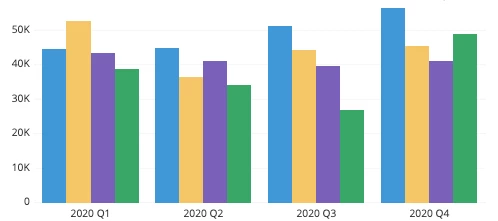
Hi! So, you’re new to our software and are looking to start out quickly. Who would we be to not help you to get sorted as soon as possible!Here are the two most relevant reports for any company to build immediately! 1. A bar-chart!Bar charts are the lifeblood of board meetings, team meetings and decks shared within companies across the globe. It isn’t hard to see why, they provide a clear overview of how things are progressing in a certain timeframe, anyone can understand. Here’s what a bar-chart would look like: An example bar-chart 2. A line-graph! Line graphs again are almost as useful. Where readability becomes an issue for bar-charts when you try to add multiple properties, line-charts really don’t have that problem. It’s easy to build, and universally applicable to any dataset. Give them a go: An example line-chart Be sure to let us know if there are any other reports you think are a MUST-have. We’ll gladly add them to this article. - Frank
Already have an account? Login
No account yet? Create an account
Enter your E-mail address. We'll send you an e-mail with instructions to reset your password.